Misova Google Slide: A Versatile Presentation Template
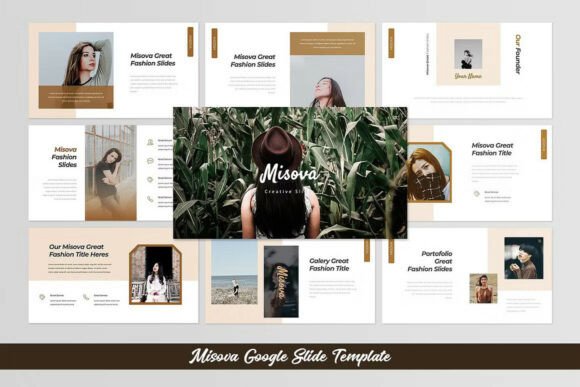
Misova Google Slide is a multi-purpose presentation template designed to simplify the creation of visually appealing and professional-looking slides. With its stylish and minimalist design, it offers users a clean canvas that can elevate the quality of their presentations across various fields. Whether you're preparing for a business meeting, academic research, or a creative project, Misova provides a structured yet flexible platform to showcase your ideas effectively.
One of the key features of Misova Google Slide is its widescreen aspect ratio of 16:9, which ensures compatibility with modern projectors and digital displays. This format allows for a more immersive viewing experience, making it ideal for presentations that require clear visuals and ample space for content.
Key Features of Misova Google Slide
The template includes 30 presentation slides, each thoughtfully designed to support different types of content. From text-heavy slides to those focused on images and infographics, Misova offers a variety of layouts to suit diverse needs. Users can choose from five color design options, allowing for customization that aligns with personal or brand aesthetics.
Additionally, the template includes placeholder images, drag-and-drop image functionality, and free fonts, making it accessible even for those without advanced design skills. The use of vector-based icons and diagrams ensures that elements remain sharp and scalable, maintaining visual clarity at any size.
Misova also provides media placeholders and font links, simplifying the process of integrating external content. The documentation included with the template helps users navigate its features efficiently, ensuring a smooth learning curve for new users.
When Misova Google Slide Is a Strong Fit
Misova Google Slide is particularly beneficial for individuals who need a reliable and adaptable presentation tool. Its minimalist design makes it suitable for professionals in fields such as education, marketing, and business, where clarity and professionalism are essential. The template's flexibility allows users to tailor it to their specific needs, whether they're presenting data, sharing research findings, or pitching an idea.
For those who prefer a straightforward approach to slide creation, Misova offers a practical solution without unnecessary complexity. Its clean layout and organized structure help maintain focus on the content rather than the design, making it an excellent choice for users who want to save time while still producing high-quality work.
Situations Where Alternatives May Be Worth Considering
While Misova Google Slide is a strong option for many users, there may be scenarios where alternative templates could be more appropriate. For instance, users who require highly customized designs or unique visual elements might find that other templates offer more extensive creative freedom. Additionally, those who need a broader range of pre-designed images or more complex animations may benefit from exploring other options.
It's also important to note that Misova does not include actual images—only placeholders for preview purposes. Users will need to source their own images or use stock photo platforms to complete their presentations. This consideration may affect the decision-making process for those who rely heavily on visual content.
Practical Considerations and Expectations
Before choosing Misova Google Slide, users should evaluate their specific requirements. If the goal is to create a polished, professional presentation with minimal effort, this template can be an excellent fit. However, if the project demands a high level of customization or unique design elements, additional tools or templates may be necessary.
Users should also consider the technical aspects of working with Google Slides. While Misova is compatible with the platform, familiarity with basic slide design principles can enhance the overall outcome. Understanding how to edit and resize elements, adjust layouts, and integrate media will help maximize the template's potential.
Conclusion
Misova Google Slide offers a balanced combination of style, functionality, and ease of use, making it a valuable resource for anyone looking to create effective presentations. Its minimalist design, customizable options, and structured layouts provide a solid foundation for a wide range of projects. However, users should assess their specific needs and consider alternatives when necessary to ensure the best possible outcome.
By understanding the strengths and limitations of Misova Google Slide, users can make informed decisions that align with their goals. Whether it's for a simple business pitch or a detailed academic presentation, this template can serve as a reliable tool in the right context.